Description
UI3DScene is an element of the NWN2's GUI which displays a 3D view of a creature.
A simple UI3DScene is defined as follows:
<UI3DScene OnRender=UI3DScene_OnRender_DisplaySceneCreature() />
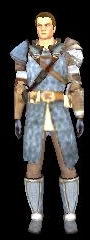
The above example will produce a minimalist 3DScene, with default lights and camera orientation, showing the creature which handles the GUI. See below:
Attributes
| Attribute | Type | Default value | Predefined constants | Description |
|---|---|---|---|---|
| name | string | none | none | The name of the element, used to reference it in scripts. |
| x | int | 0 | ALIGN_LEFT, ALIGN_CENTER, ALIGN_RIGHT | Horizontal coordinates in the parent element. |
| y | int | 0 | ALIGN_TOP, ALIGN_CENTER, ALIGN_BOTTOM | Vertical coordinates in the parent element. |
| width | int | PARENT_WIDTH | PARENT_WIDTH, SCREEN_WIDTH | Width of the element. |
| height | int | PARENT_HEIGHT | PARENT_HEIGHT, SCREEN_HEIGHT, DYNAMIC | Height of the element. |
| texture | string | none | none | Background image (example: "inv_3d_bg.tga"). |
| cameralook_x | float | 0 | none | Camera orientation, x axis. |
| cameralook_y | float | 0 | none | Camera orientation, y axis. |
| cameralook_z | float | 0 | none | Camera orientation, z axis. |
| camerapos_x | float | 0 | none | Camera position, x plane. |
| camerapos_y | float | 0 | none | Camera position, y plane. |
| camerapos_z | float | 0 | none | Camera position, z plane. |
| ambground_intens | float | 0 | none | Ground light, intensity. |
| ambgroundcolor_r | float | 0 | none | Ground light, red. |
| ambgroundcolor_g | float | 0 | none | Ground light, green. |
| ambgroundcolor_b | float | 0 | none | Ground light, blue. |
| ambsky_intens | float | 0 | none | Sky light, intensity. |
| ambskycolor_r | float | 0 | none | Sky light, red. |
| ambskycolor_g | float | 0 | none | Sky light, green. |
| ambskycolor_b | float | 0 | none | Sky light, blue. |
| light_intens | float | 0 | none | Global light, intensity. |
| lightdir_x | float | 0 | none | Global light orientation, x axis. |
| lightdir_x | float | 0 | none | Global light orientation, y axis. |
| lightdir_x | float | 0 | none | Global light orientation, z axis. |
| diffusecolor_r | float | 0 | none | Color diffusion, red. |
| diffusecolor_g | float | 0 | none | Color diffusion, green. |
| diffusecolor_b | float | 0 | none | Color diffusion, blue. |
| update | bool | false | none | Triggers the OnUpdate event. |
| handleactiontarget | bool | untested | none | Untested. |
| scalewithscene | bool | untested | none | Untested. |
Events
OnRender
The OnRender event occurs when the UI3DScene is diplayed on screen.
It is known to be usable with the following functions:
- UI3DScene_OnRender_DisplaySceneCreature
- UI3DScene_OnRender_DisplayTempCreature
OnUpdate
The OnUpdate event occurs when the UI3DScene is updated.
It is known to be usable with the following functions:
- UI3DScene_OnUpdate_UpdateCamera
OnMouseDropReceived
The OnMouseDropReceived event occurs when an element is dropped on the UI3DScene.
It is known to be usable with the following functions:
- UI3DScene_OnDropReceived_EquipItem
Examples
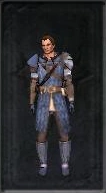
Here is how to create a UI3DScene more evolved than the minimal one:
<UI3DScene name="3DScene" x="ALIGN_CENTER" y="ALIGN_CENTER" width="136" height="248" texture="inv_3d_bg.tga"
    cameralook_x="0.0" cameralook_y="0.0" cameralook_z="1.25"
    camerapos_x="0.25" camerapos_y="2.70" camerapos_z="1.70"
    ambground_intens=".4" ambgroundcolor_r=".7" ambgroundcolor_g=".55" ambgroundcolor_b=".4"
    ambsky_intens=".8" ambskycolor_r=".3" ambskycolor_g=".4" ambskycolor_b=".78"
    light_intens="1.0" diffusecolor_r="1.10" diffusecolor_g="1.0" diffusecolor_b="1.0"
    lightdir_x="1.0" lightdir_y="1.0" lightdir_z="2.15"
    OnRender=UI3DScene_OnRender_DisplaySceneCreature() />
And it looks like this:
More
It's also possible to add custom lights to the 3DScene by using the element UIPointLight.